
Many engineering systems can be represented as networks of discrete components connected in a defined way. Such networks may describe, for example, a power plant, a heat exchanger network, or equipment subdivided into smaller elements. Mathematically, each component is described by a set of equations. When these components are connected, they form a system of equations that represents the behaviour of the overall system. Our Integrated Process Simulation Environment, IPSE, provides a comprehensive set of modules for building such models graphically and solving them efficiently. This sophisticated yet intuitive modelling concept forms the foundation of IPSE’s capabilities.
Based on standardized components, IPSE supports the efficient creation, management, and analysis of process models. Powerful mathematical methods, structured data handling, and an intuitive graphical interface allow users to focus on the technical aspects of their engineering tasks.
Model Libraries
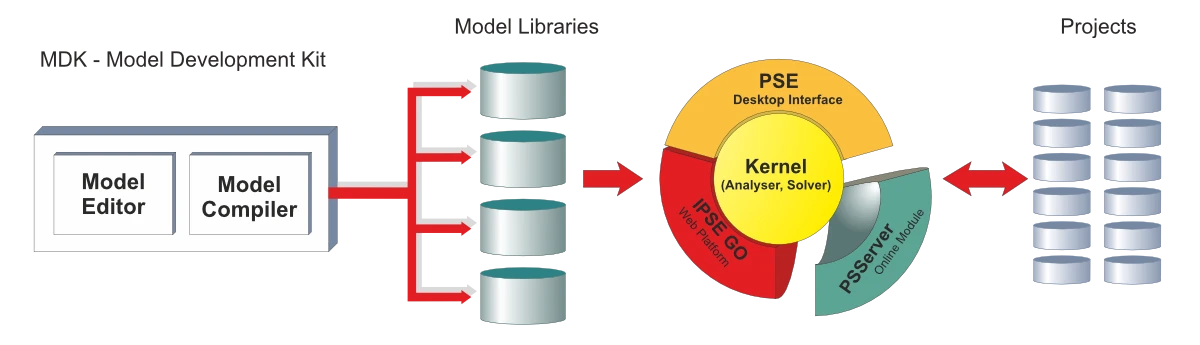
The key to IPSEpro’s flexibility is its concept of model libraries: IPSEpro is adjusted to a specific area by loading an appropriate model library. Since the user can create his own libraries, there are virtually no limits to the application of IPSEpro. Thus, IPSEpro allows flexibility at two levels: at the component level and at the process level.
Component Level Flexibility
IPSEpro provides unlimited flexibility in defining the characteristics of the component models that are used for modeling processes. This allows the user to build component model libraries that exactly match his application requirements.
The component model building process is easy and interactive. The user designs his models mathematically and graphically within MDK, IPSEpro’s Model Development Kit.
The user can also modify and customize existing component models from standard model libraries, using MDK, if required.
IPSEpro allows complete freedom in arranging the available components in order to represent a process scheme. A graphical user interface facilitates and accelerates substantially the development of process schemes, and the presentation of the results of calculations.
To set up a process model, the user chooses component icons from a library menu, places and connects them appropriately in the project window of PSE, IPSEpro’s Process Simulation Environment. Numerical data and results of process calculations are entered and displayed directly in the project window.
IPSEpro allows the user to simulate the behavior of single elements of processes, of parts of a process and of models of complete plants. IPSEpro provides efficient data management, and uses robust algorithms that devise extremely short calculation time.
IPSEpro's Structure
The structure of IPSEpro with its main modules MDK and PSE has the advantage that the flow of data is well defined.
In a production environment, the models in a library typically represent an established modeling standard . Modifications of the models in library may have far reaching consequences. Changes should therefore only be made by authorized and qualified users. This is achieved by restricting the usage of MDK to these authorized users.
Frequently the author of a model library is different from the actual user of the library. The user of the library will then only use PSE, so that accidental changes of the library are not possible.
It is possible to compare a model library with a program written in a traditional programming language. Only one or few qualified persons have access to the source code, while a much larger number of persons are using the executable code.
In research and development, model libraries are considerably more dynamic. Therefore users should have full access to both PSE and MDK.
Major Configurations
IPSEpro has a modular structure, so that the requirements of a specific configuration can easily be taken into account. With its two major configurations: the Design Suite and the Plant Operation Suite, IPSEpro covers the entire lifecycle of a process plant.
IPSEpro Design Suite allows you to create process model graphically by appropriately connecting component models from a library. Customized component models can be easily built using IPSEpro's Model Development Kit, to integrate the model library used by your application project. IPSEpro provides efficient data management, powerful mathematical methods and an intuitive graphic user interface, so that you can fully concentrate on the technical aspects of your models. With virtually unlimited flexibility, IPSEpro Design Suite allows you to modify existing component models or to create your own customized ones in order to meet exactly your modeling requirements.
Major Modules of Design Suite include:
- PSE
- MDK
- PSOptimize
- PSXLink
An Overview of the IPSEpro Plant Operation Suite
IPSEpro Plant Operation Suite is an on-line performance monitoring and optimization system that is fully integrated into the IPSEpro framework of applications.By using IPSEpro Plant Operation Suite you are able to predict the most profitable way to run your plant, and to measure and track plant performance changes. IPSEpro Plant Operation Suite is highly flexible and customizable so that it can be efficiently adjusted for a wide range of applications.
IPSEpro Plant Operation Suite Features:
- Models exactly tuned for your plant’s requirements, due to IPSEpro’s capability to create and modify component models.
- Seamless integration with virtually any plant data management (PDM) system, including OSIsoft’s PI and proprietary PDM systems on the basis of Oracle and Sybase databases.
- Optimization based on physical plant models.
- Data Validation.
- Sharing of plant models with off-line system for investigation of “What-if” scenarios.
IPSEpro Plant Operation Suite offers you the following benefits:
- Enhanced profitability by providing optimum values of operating parameters.
- Improved performance through the identification of degradation.
- Identification of faulty sensors and inconsistent measurements.
- Increased reliability through better knowledge of your plant’s operation.
Plant Operation Suite Deployment
According to your preferences, we can install a completely configured Plant Operation Suite or we can customize the Plant Operation Suite together with your performance engineers and operating staff.
Check about the Program Modules that you can use in the IPSEpro Plant Operation Suite.
Major Modules of Plant Operation Suite include:
- PSServer
- PSOptimize
- PSValidate